Scheduler
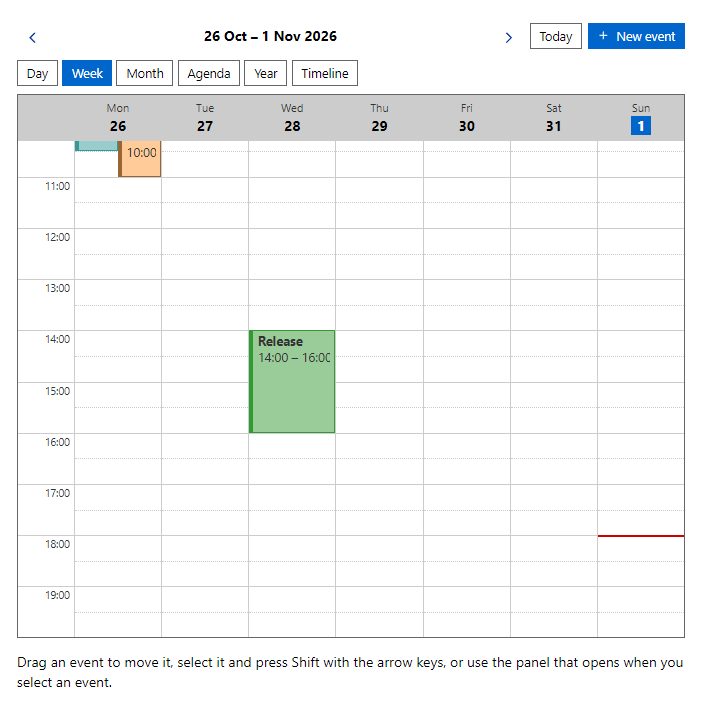
CompleteDay, week, month, agenda, year and timeline views with events placed by time, overlapping events side by side, drag and drop to move an event, Shift with the arrow keys as the keyboard way, and a panel with a date and time field that opens when an event is selected, so events can also be moved on touch screens. All-day events (AllDay) sit in a row above the hours, and a red line marks the current time. The week and day views work in the visible hours (DayStartHour to DayEndHour).
Example
Parameters
| Parameter | Type | Description |
|---|---|---|
AgendaDays | int | Days listed by the Agenda view (default 30). |
AutoScroll | bool | Scrolls the day and week views to the current time or the start of the working hours (default true). |
BlockedRanges | IEnumerable<SchedulerBlockedRange> | Periods that cannot be booked (all resources or one). |
Categories | IEnumerable<SchedulerCategory> | Labels along the horizontal axis. |
Class | string | Extra CSS classes added to the root element. |
ContextMenuItems | Func<SchedulerContextTarget, IEnumerable<MenuCommand>> | Returns extra commands for the context menu of an event, a time slot or a day; they are added after the built-in commands. Receives the target (kind, event, start time, resource). Opens on right click, the Menu key and Shift+F10. |
Date | DateTime | Any date inside the shown period. Use with @bind-Date. |
DayEndHour | int | Hour where the day grid ends (default 20). |
DayStartHour | int | First hour of the day grid (default 7). |
Editable | bool | Allows moving events by dragging or with the keyboard. |
Events | IEnumerable<SchedulerEvent> | SchedulerEvent objects; moving an event changes its Start and End. |
EventTemplate | RenderFragment<SchedulerEvent> | Draws the content of an event instead of its title (a second line, badges); gets the event. SchedulerEvent.CssClass adds a CSS class to the event element. |
FirstDayOfWeek | DayOfWeek? | First weekday; defaults to the current language. |
GroupByResource | bool | Day view: one column per resource. |
HideNonWorkDays | bool | Leaves non-working days out of the week view. |
HideWeekends | bool | Leaves Saturday and Sunday out of the week view. |
MaxEventsPerDay | int | Events shown in a day before the +n more link (default 3). |
MaxVisibleResources | int | How many resource columns the grouped day view shows before a button reveals the rest (0 = all). |
PreventOverlap | bool | Refuses changes that make a timed event overlap another event of the same resource. |
ResourceFilterThreshold | int | The number of resources above which a filter box is shown in the grouped and timeline views (default 8). |
Resources | IEnumerable<SchedulerResource> | Rooms, people or equipment (SchedulerResource with Id and Name). Events point to one with ResourceId. |
SeriesCheckDays | int | How many days ahead the occurrences of a repeating event are checked for overlaps and blocked ranges when it is saved (default 90). |
ShowContextMenu | bool | Opens a menu on the right mouse button, the Menu key and Shift+F10 (default true). |
ShowEventEditor | bool | Opens the event editor dialog to create and change events. |
ShowICalendar | bool | Adds import and export of iCalendar (.ics) files. |
ShowLegend | bool | Shows the clickable legend. |
ShowMovePanel | bool | Shows the date and time panel for the selected event (default true). |
ShowNavigator | bool | Shows a month calendar beside the views for quick navigation. |
ShowPrint | bool | Adds a Print button that prints the table. |
ShowQuickInfo | bool | Shows a details panel with edit and delete for the selected event. |
ShowSearch | bool | Adds a search box that filters the events. |
ShowWorkHours | bool | Shades the time outside work hours and days. |
SlotMinutes | int | Length of a slot: 5, 10, 15, 20, 30 or 60. |
Style | string | Inline style added to the root element. |
TimelineDays | int | How many days the Timeline view shows (1, 7, 14 or 30; any number from 1 to 60). With more than one day the header shows days and the view scrolls sideways. |
TimeZone | string | Zone the grid is shown in (a system time zone id such as Europe/Sofia). |
View | SchedulerView | Day, Week, Month, Agenda, Year or Timeline. Use with @bind-View. |
Views | IReadOnlyList<SchedulerView> | The views the Scheduler offers, in this order (the keys 1 to 9 follow it). One view hides the view switcher; a View that is not in the list becomes the first one. OnRangeChanged still reports the shown range (a single day for Day). |
WorkDays | IEnumerable<DayOfWeek> | Working days (default Monday to Friday). |
WorkEndHour | int | Hour where work ends (default 17). |
WorkStartHour | int | First working hour (default 9). |
Events
| Event | Type | Description |
|---|---|---|
DateChanged | EventCallback<DateTime> | |
OnConflict | EventCallback<SchedulerConflict> | Raised when a change was refused because of an overlap or a blocked period. |
OnEventChanged | EventCallback<SchedulerEvent> | Raised after an event was moved. |
OnEventClick | EventCallback<SchedulerEvent> | Raised with the clicked event. |
OnEventCreated | EventCallback<SchedulerEvent> | Raised after an event was created or imported. |
OnEventDeleted | EventCallback<SchedulerEvent> | Raised after an event or series was deleted. |
OnRangeChanged | EventCallback<SchedulerRange> | Raised with the shown period when the date or the view changes. |
OnReminder | EventCallback<SchedulerEvent> | Raised once per occurrence when its reminder time is reached. |
OnSlotClick | EventCallback<DateTime> | Raised with the start time of the clicked slot; also enables the New event button. |
OnSlotSelected | EventCallback<SchedulerSlot> | Raised when an empty slot is clicked, with its start, end and the resource of the column or row (SchedulerSlot). |
TimelineDaysChanged | EventCallback<int> | |
ViewChanged | EventCallback<SchedulerView> |
Package
Scheduler is part of RayCraft Complete. Package: RayCraft.Blazor.Complete. It comes from the private RayCraft feed and needs an active license. See Getting started.
Related controls
Send feedbackVersion 1.0.3