PivotGrid
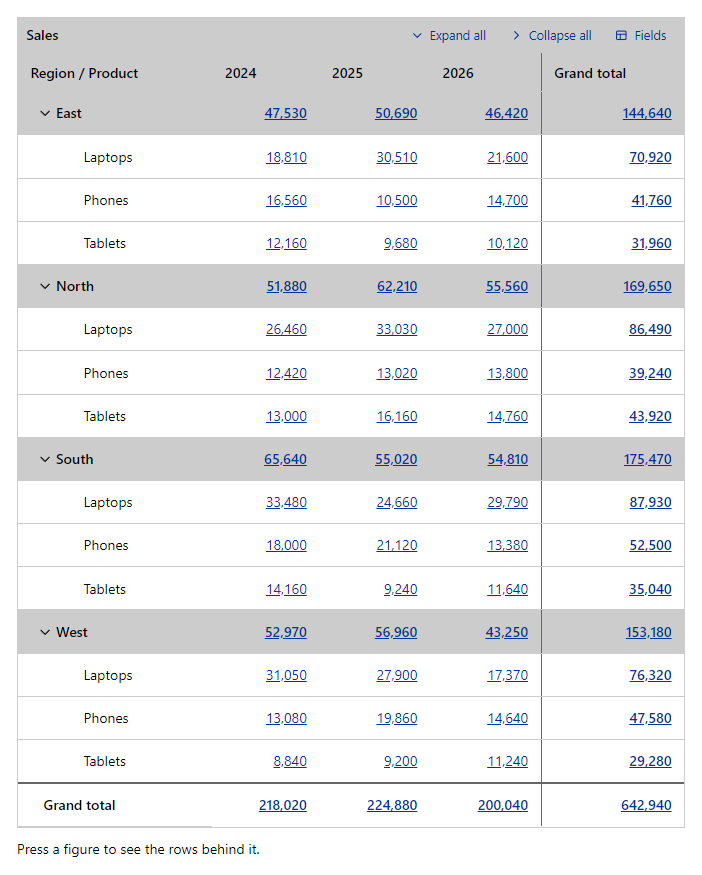
CompleteSummarizes a list into a cross-table: fields on the rows, fields across the columns and figures in the cells, with subtotals, grand totals and a field chooser.
Example
Parameters
API
| Parameter | Type | Description |
|---|---|---|
Class | string | Extra CSS classes added to the root element. |
Dense | bool | Uses tighter cell padding. |
ExportFileName | string | File name of the CSV export, without the extension. |
Fields | RenderFragment | The fields that can be filtered. |
Items | IEnumerable<TItem> | The items to summarize. |
Label | string | Visible label text (charts: accessible name; IconButton: accessible name and tooltip). |
ShowColumnSubtotals | bool | Adds a subtotal column after the columns of each upper column level. |
ShowExport | bool | Adds a button to the toolbar that saves the table as a CSV file. |
ShowFieldZones | bool | Shows the fields in zones that accept drag and drop (hidden, rows, columns, values). |
ShowGrandTotals | bool | Adds a total row and, when there are column fields, a total column. |
ShowToolbar | bool | Shows the toolbar with the field chooser and, when set, the export button. |
Style | string | Inline style added to the root element. |
PivotField
| Parameter | Type | Description |
|---|---|---|
Aggregate | DataGridAggregate | Adds a summary row value: Sum, Average, Min, Max or Count. |
Area | PivotArea | Where the field starts: Row, Column, Value or Hidden. |
Format | string | Format string for numbers and dates, e.g. N0 or d. |
Title | string | Title text (drawer header, tab caption, column header, step caption). |
Value | Func<TItem, Object> | Reads the value of the field from an item. |
Events
API
| Event | Type | Description |
|---|---|---|
OnCellClick | EventCallback<PivotCellClick<TItem>> | Raised when a figure is pressed, with the row and column keys, the figure and the items behind it. |
Package
PivotGrid is part of RayCraft Complete. Package: RayCraft.Blazor.Complete. It comes from the private RayCraft feed and needs an active license. See Getting started.
Send feedbackVersion 1.0.3