Dialog
FreeModal window. Focus moves into it and stays inside until it closes (Escape, the close button or a backdrop click); focus then returns to the previous element. From code, use IRayCraftDialogs.ConfirmAsync / AlertAsync for messages, PromptAsync for a text value (null when cancelled), or ShowAsync<TComponent> to show your own component; it receives a cascading DialogContext whose Close(data) and Cancel() finish the dialog. This needs one DialogHost in your layout.
Example
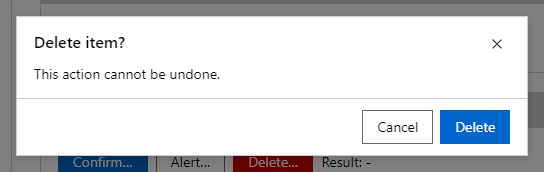
Parameters
| Parameter | Type | Description |
|---|---|---|
Actions | RenderFragment | Buttons shown at the bottom of the dialog. |
ChildContent | RenderFragment | Content rendered inside the component. |
Class | string | Extra CSS classes added to the root element. |
Open | bool | Whether the drawer is shown. Use with @bind-Open. |
Persistent | bool | Backdrop clicks and Escape do not close the dialog. |
Style | string | Inline style added to the root element. |
Title | string | Title text (drawer header, tab caption, column header, step caption). |
Events
| Event | Type | Description |
|---|---|---|
OpenChanged | EventCallback<bool> | Raised when the drawer asks to close. |
Package
Dialog is part of RayCraft Free. Package: RayCraft.Blazor. It comes from nuget.org. See Getting started.
Related controls
- DialogHostThe place where dialogs opened from code are shown (IRayCraftDialogs.ConfirmAsync, AlertAsync, PromptAsync, ShowAsync).
- ColorDialogA dialog for choosing a color.
- FontDialogA dialog for choosing a font.
Send feedbackVersion 1.0.3