Adaptive | bool | Shows each row as a card on narrow screens. |
AllowAdd | bool | Shows an Add button that creates a new item (see NewItemFactory). |
AllowCardView | bool | Adds a toolbar button that switches between the table and the card view. |
AllowDelete | bool | Shows the Delete command in the command column (asks for confirmation). |
AllowEdit | bool | Shows the Edit command in the command column. |
AllowPaste | bool | Batch mode: adds a Paste button that fills editable cells from tab separated clipboard text. |
AllowView | bool | Adds a View command that shows the row read-only in a dialog. |
CardView | bool | Shows every row as a card instead of a table row. Use with @bind-CardView. |
CellNavigation | bool | Makes the grid a keyboard grid: arrow keys, Home, End, Page Up and Page Down move between cells; Enter, F2 or Space activate the control in the cell. |
Class | string | Extra CSS classes added to the root element. |
ColumnMenu | bool | Adds a menu button to each header with sorting and hide column commands. |
Columns | RenderFragment | Column definitions: DataGridColumn elements. |
DataProvider | Func<DataGridRequest, ValueTask<DataGridResult<TItem>>> | Loads rows from your side: receives the start, count, sort, filters, search, groups and aggregates and a cancellation token (cancelled when a newer request starts or the grid is removed), returns a DataGridResult. |
Dense | bool | Uses tighter cell padding. |
DetailTemplate | RenderFragment<TItem> | Content shown under a row when its expand button is pressed. |
EditMode | DataGridEditMode | None, Row (inline), Dialog or Batch (all rows at once). |
EmptyContent | RenderFragment | Shown when there are no rows. |
ExportChoices | bool | Turns Export into a menu: CSV or JSON, current view, selected rows, all rows, hidden columns. |
ExportFileName | string | File name of the CSV export, without the extension. |
FilterOperators | bool | Adds an operator list (contains, starts with, equals, greater than, is empty...) above each filter box. |
FormatRules | IEnumerable<DataGridFormatRule> | Rules that colour cells or rows: field, filter operator, value, severity and Cell or Row. The first matching rule wins. |
FreezeFirstColumn | bool | Keeps the first column visible while scrolling sideways. |
FrozenColumns | int | Number of leading columns kept in view while the rest scrolls sideways. |
FrozenEndColumns | int | Number of columns at the right edge that stay in view while the table scrolls sideways. |
FrozenRows | int | Number of rows that stay under the header while the body scrolls (needs Height). |
GroupBy | Func<TItem, Object> | Groups rows by the returned value; each group has a collapsible header. |
GroupPanel | bool | Adds a strip above the table where users group rows by dragging headers or choosing columns. |
GroupSummary | bool | Shows the column aggregates in the group rows (computed locally, or taken from DataGridResult.Groups with a DataProvider). |
GroupTitle | string | Text before the group value in the header. |
Height | string | Maximum height of the grid body, for example 24rem (default 28rem with VirtualScroll). |
ItemKey | Func<TItem, Object> | Returns a stable key per item, so selection and open details survive reloads. |
Items | IEnumerable<TItem> | The options to choose from. |
KeyboardShortcuts | bool | Ctrl+A select all, Ctrl+C copy selected rows, Esc clear selection, Alt+arrows change page. |
Label | string | Visible label text (charts: accessible name; IconButton: accessible name and tooltip). |
Loading | bool | Shows a progress bar above the rows. |
LoadingSkeleton | bool | Shows placeholder rows during the first load. |
LoadMore | bool | Replaces the pager by a Load more button that appends the next page. |
MultiSort | bool | Shift+click on headers sorts by several columns; the headers show the order. |
NewItemFactory | Func<TItem> | Creates the item for a new row; default is the parameterless constructor. |
NoMatchContent | RenderFragment | Content shown when filters or search leave no rows (default: a text with Clear filters). |
PageSize | int | Rows per page. |
PageSizeOptions | IEnumerable<int> | Row counts offered in a drop-down under the table. |
Paging | bool | Shows the paging bar (default true). |
PastePreview | bool | Batch mode: shows what a paste will change and asks before it is applied (default on). |
PersistKey | string | Remembers the position and size (Window), the split (Splitter) or the layout of a DataGrid (sort, filters, columns, widths, page) in local storage under this name and restores them next time. |
Reorderable | bool | Lets users move columns by dragging headers or with the Columns menu. |
Resizable | bool | Adds a drag handle (and arrow keys) to resize each column. |
RowClass | Func<TItem, string> | Returns an extra CSS class for a row. |
RowHeight | int | Row height in pixels when VirtualScroll is on (default 44). |
RowMenu | Func<TItem, IEnumerable<MenuCommand>> | Returns the commands of the context menu of a row. |
RowReorder | bool | Lets rows be dragged onto each other; handle RowMoved to change your list. |
RowSeverity | Func<TItem, Severity?> | Returns a severity to tint a row, or null. |
RowValidator | Func<TItem, IEnumerable<string>> | Checks the whole row after the edit is applied; returns error texts. |
SelectedItems | IEnumerable<TItem> | Selected rows. Use with @bind-SelectedItems. |
Selection | SelectionMode | None (default), Single or Multiple. |
SelectionActions | RenderFragment<IReadOnlyList<TItem>> | Buttons in the selection bar; receives the selected items. |
ServerBulkLimit | int | With DataProvider: the largest number of rows the grid asks for in one request to select all filtered rows or to export them (default 10000). Above it only the rows on the page are used. |
ShowCopy | bool | Shows the copy button. |
ShowFilters | bool | Shows a filter box under each filterable column header. |
ShowPrint | bool | Adds a Print button that prints the table. |
ShowSearch | bool | Adds a search box that finds text in all columns and marks it in the cells. |
ShowSelectionBar | bool | Shows the bar with the selected count, select all rows and clear selection (Multiple selection). |
ShowToolbar | bool | Shows the toolbar with the column chooser and CSV export. |
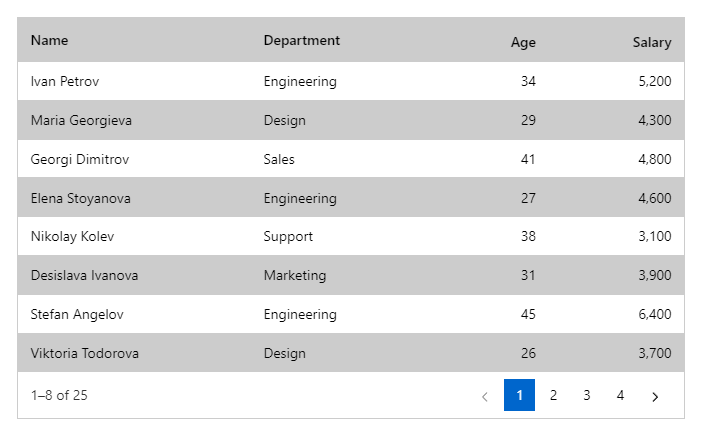
Striped | bool | Shades every second row. |
Style | string | Inline style added to the root element. |
ToolbarContent | RenderFragment | Extra content in the toolbar of a grid with ShowToolbar, for example DataGridSpreadsheetButton. |
TypedFilters | bool | Uses number, date and yes/no filter boxes by the type of the column values (default on). |
UndoRedo | bool | Adds Undo and Redo for saved row edits, added rows and deleted rows (buttons and Ctrl+Z / Ctrl+Y). |
ValueFilters | bool | Adds a value list filter (search, select all, clear) to each filterable header; works on items in memory. |
VirtualScroll | bool | Draws only the visible rows (rows must have the fixed RowHeight). |