FileExplorer
CompleteFile browser for a store that your code provides (a database, a disk or a cloud). The folder tree loads its subfolders when a folder is opened, the list shows the files in details or tiles with sorting and search, and several files can be selected. New folder, rename, delete and upload (with progress for every file) call your IFileExplorerSource; Capabilities tells which commands the source supports, and the others are hidden. Keyboard: arrows move, Shift and arrows extend the selection, Ctrl+A selects all, Space toggles, Enter opens, F2 renames, Delete removes, Ctrl+X and Ctrl+V move, Backspace goes up.
Example
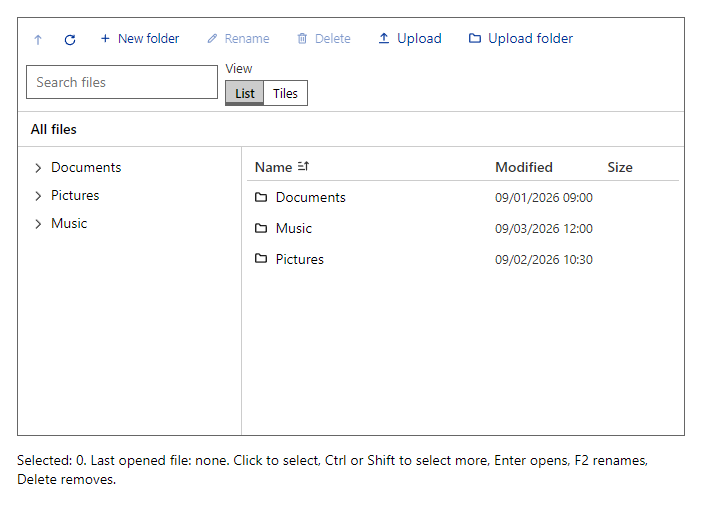
Parameters
| Parameter | Type | Description |
|---|---|---|
Class | string | Extra CSS classes added to the root element. |
FolderId | string | The open folder (null is the top). Use with @bind-FolderId. |
Label | string | Visible label text (charts: accessible name; IconButton: accessible name and tooltip). |
MaxUploadFiles | int | Most files accepted in one upload or drop (default 1000). |
MaxUploadSize | Int64 | Larger files are refused and shown as failed (bytes). |
ReadOnly | bool | Hides every editing command. |
Source | IFileExplorerSource | The IFileExplorerSource that lists and changes the files. |
Style | string | Inline style added to the root element. |
Events
| Event | Type | Description |
|---|---|---|
FolderIdChanged | EventCallback<string> | |
OnError | EventCallback<Exception> | Raised with the exception when a source command fails. |
OnOpen | EventCallback<FileEntry> | Raised with a file the user opens (double click or Enter). |
OnSelectionChanged | EventCallback<IReadOnlyList<FileEntry>> | Raised with the selected entries every time the selection changes. |
Package
FileExplorer is part of RayCraft Complete. Package: RayCraft.Blazor.Complete. It comes from the private RayCraft feed and needs an active license. See Getting started.