ProofingPanel
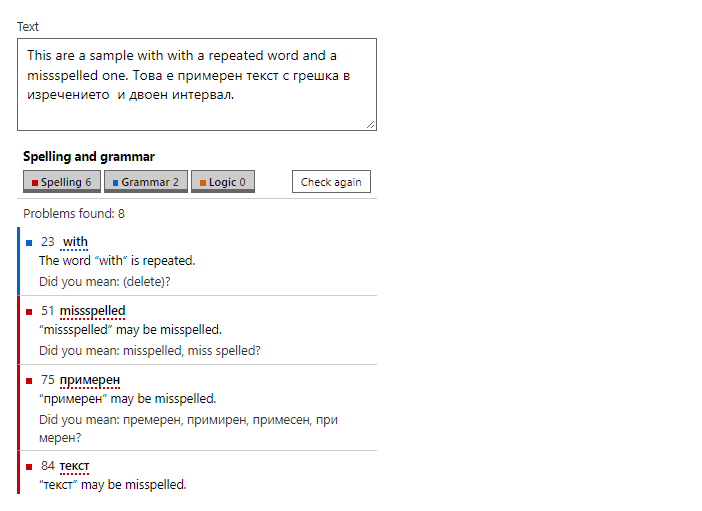
CompleteThe list of spelling, grammar and logic issues that the PDF viewer, the document editor, the spreadsheet and the presentation editor show. Each entry can be selected, corrected with a suggestion, or ignored, and the kinds can be filtered.
Example
Parameters
| Parameter | Type | Description |
|---|---|---|
Busy | bool | Shows a progress line instead of the result. |
Class | string | Extra CSS classes added to the root element. |
Entries | IReadOnlyList<ProofingEntry> | The issues, in document order: ProofingEntry with an identifier, a location text, the issue and optional context. |
MaxShown | int | Most entries listed at once (default 300). |
MaxSuggestions | int | Most suggestions listed per entry (default 5). |
ReadOnly | bool | Hides the replace buttons; the suggestions are listed as text. |
SelectedId | string | Identifier of the entry the control currently shows. |
Status | string | Progress text while Busy. Defaults to a localized Checking. |
Style | string | Inline style added to the root element. |
Title | string | Panel title. Defaults to a localized Spelling and grammar. |
Events
| Event | Type | Description |
|---|---|---|
OnApply | EventCallback<ValueTuple<ProofingEntry, string>> | Raised with the entry and the suggestion that was picked. |
OnClose | EventCallback | Raised by the close button, which is shown only when the event is handled. |
OnIgnore | EventCallback<ProofingEntry> | Raised with the entry to ignore once. |
OnIgnoreAll | EventCallback<ProofingEntry> | Raised with a spelling entry whose word is ignored everywhere. |
OnRecheck | EventCallback | Raised by the Check again button, which is shown only when the event is handled. |
OnSelect | EventCallback<ProofingEntry> | Raised with the entry that was clicked. |
Package
ProofingPanel is part of RayCraft Complete. Package: RayCraft.Blazor.Complete. It comes from the private RayCraft feed and needs an active license. See Getting started.
Send feedbackVersion 1.0.3