CheckboxGroup
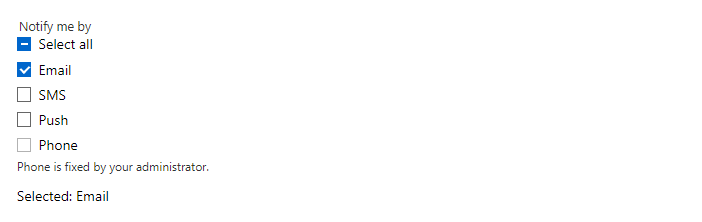
FreeA group of check boxes for choosing several items from a list, inside a fieldset with a legend so screen readers announce the group name. ShowSelectAll adds a Select all box that shows the mixed state when only some items are chosen.
Example
Parameters
| Parameter | Type | Description |
|---|---|---|
Class | string | Extra CSS classes added to the root element. |
Direction | StackDirection | Column (default) or Row. |
Disabled | bool | Disables interaction. |
HelperText | string | Hint shown below the field. |
ItemDisabled | Func<string, bool> | Returns true for items that cannot be changed; the other items stay editable. |
ItemIcon | Func<string, IconName?> | Returns the icon of an item. |
Items | IEnumerable<string> | The options to choose from. |
ItemText | Func<string, string> | Converts an item to its display text (defaults to ToString()). |
Label | string | Visible label text (charts: accessible name; IconButton: accessible name and tooltip). |
Multiple | bool | Allows several selected rows: click, Ctrl+click, Shift+click, Shift+arrows, Ctrl+A (VirtualList). |
ShowSelectAll | bool | Shows a Select all box above the items. |
Style | string | Inline style added to the root element. |
Value | string | Current value. Use with @bind-Value. |
Values | IReadOnlyCollection<string> | The chosen items. Use with @bind-Values. |
Events
| Event | Type | Description |
|---|---|---|
ValueChanged | EventCallback<string> | Raised when the value changes. |
ValuesChanged | EventCallback<IReadOnlyCollection<string>> | Raised when the chosen items change. |
Package
CheckboxGroup is part of RayCraft Free. Package: RayCraft.Blazor. It comes from nuget.org. See Getting started.
Send feedbackVersion 1.0.3